Pagination
The sort applies to the whole table, not to the page on screen: sorting a paged table reorders every row and then rebuilds the pages.
Click a column heading and the table reorders itself. The work is in telling Tabulizer which columns may be sorted, how to read their values, and which rows are headers that must stay where they are.
Sorting puts a small arrow in the heading of every sortable column. A click sorts the table by that column, a second click reverses it. The reordering happens in the visitor's browser, so it is instant, and only the data rows move: the rows you declare as header or footer stay where they are.
A table can also arrive already sorted, by a column you choose, in the direction you choose.
In step 2 (Format), tick Table Sorting in the list of table features.
In step 4 (Features), find Table/Sort and tick Enable Table Sorting: Yes.
Set Header Size to the real number of header rows, and Footer Size if the table ends with totals. Those rows are then left out of the sort.
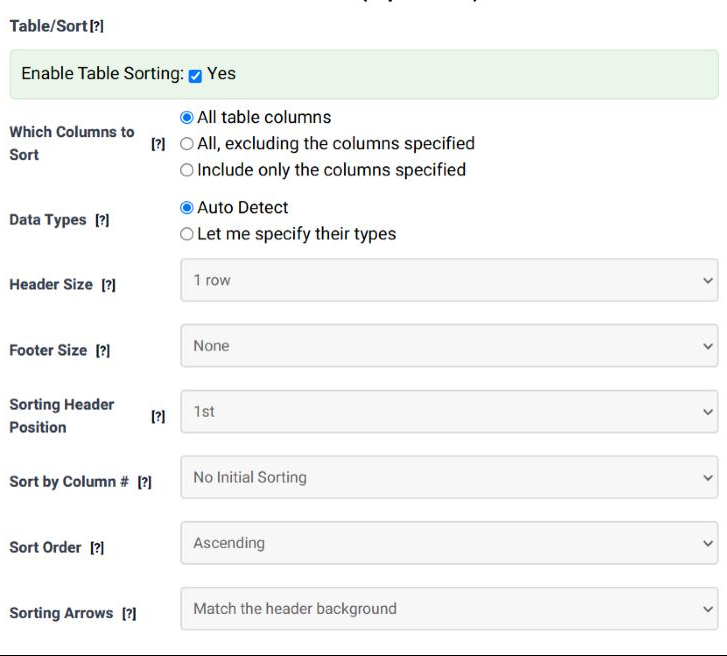
| Field | What it does | Options | Default |
|---|---|---|---|
| Enable Table Sorting | Switches sorting on. The rest of the panel is ignored while this is unticked. | Yes / no | Not ticked |
| Which Columns to Sort | Whether every column is sortable or only some of them. The second and third choices show a tick box per column, where you name the exceptions or the ones to include. | All table columns; All, excluding the columns specified; Include only the columns specified | All table columns |
| Data Types | How each column's values are read when two of them are compared. Auto Detect works it out from the data; Let me specify their types opens a type list per column. | Auto Detect; Let me specify their types | Auto Detect |
| Header Size | How many rows at the top of the table are headers. They are not sorted, and the sorting controls are placed in them. | 1 row … 5 rows | 1 row |
| Footer Size | How many rows at the bottom are footers. They are not sorted either, so a totals line stays at the bottom whatever the visitor clicks. | None, 1 row … 5 rows | None |
| Sorting Header Position | Which header row carries the arrows, when the header is more than one row deep. A table with a group title in row 1 and the column names in row 2 wants the arrows in row 2. | 1st, 2nd, 3rd, 4th, 5th | 1st |
| Sort by Column # | The column the table is sorted by when the page opens. No Initial Sorting leaves the data in the order the data source produced it. | No Initial Sorting; 1st Column … 10th Column | No Initial Sorting |
| Sort Order | The direction of that first sort. | Ascending, Descending | Ascending |
| Sorting Arrows | The colour of the little arrows in the headings. They are drawn in one fixed colour, so dark arrows disappear into a dark header and light ones into a light header. Match the header background picks a colour that shows up; Leave them to the theme hands the job to your site's stylesheet. | Match the header background; Dark grey; Grey; Light grey; White; Blue; Light blue; Red; Light red; Green; Light green; Brown; Light brown; Purple; Light purple; Leave them to the theme | Match the header background |
Values on a page are text. Sorted as text, 10 comes before 9 and 24/08/2020 comes before 08/24/2019. The data type is what tells Tabulizer to read a column as a number or a date before comparing.
| Type | Use it for |
|---|---|
| Text - Alphabetic | Ordinary words in a Latin alphabet. |
| Text - Alphabetic (Non Latin) | Greek, Cyrillic, accented alphabets - anything that does not sort the plain Latin way. |
| Number - Integer | Whole numbers. |
| Number - Decimal (dot separator) | 10.34 or 1,500.34 |
| Number - Decimal (comma separator) | 10,34 or 1.500,34 |
| Number - Auto Detection | A numeric column whose format varies. |
| Date - Year Month Day | 2020-08-24 |
| Date - Month Day Year | 08/24/2020, 08-24-2020, 08.24.2020 |
| Date - Day Month Year | 24/08/2020, 24-08-2020, 24.08.2020 |
| Date - Year Month / Month Year | 2020-08 / 08-2020 |
| Date - Day Month / Month Day | 24/08 / 08/24 |
| Date - Auto Detection | A date column whose format varies. |
| Custom Data Type | Anything the list above cannot express - see below. |
Choosing Custom Data Type for a column adds three more fields:
| Field | What it holds |
|---|---|
| Custom type name | A name for your type, Latin letters and numbers only. It starts as myCustomType. |
| Custom type definition | Three JavaScript functions, because sorting normally happens in the browser. Replace * with your type name: *-pre turns the cell's text into the value to compare (strip a currency symbol, say); *-asc compares two values for an ascending sort; *-desc does the same for descending. |
| Server Side Sorting Function | Optional. A PHP function used instead, and only when the table is in Server Side mode, where the sorting is done by the server rather than the browser. |
The sort applies to the whole table, not to the page on screen: sorting a paged table reorders every row and then rebuilds the pages.
The visitor can filter and sort at the same time; the sort stays as the filter changes.
Sorting works inside each table a split produces, not across them. A split by rows is applied first, so the sort cannot move a row from one table into another.
The column is being read as text. Set Data Types to Let me specify their types and give that column a number type. A stray currency symbol or a footnote mark in one cell is the usual reason auto detection gives up.
Header Size is too small. Set it to the real number of header rows; then set Sorting Header Position to the row that holds the column names.
Yes. Choose All, excluding the columns specified and tick that column. An image or an action column is the usual case.
They are probably the same colour as the header. Change Sorting Arrows from the automatic setting to a colour that contrasts with it.
Yes - the table's state is remembered, so the column they sorted by and the direction come back with them.
Open the Table Wizard, tick Table Sorting in step 2 and set it up in step 4.
Open the Table Wizard