Pagination
One table. The visitor is shown part of it and clicks to see the rest. Sorting and filtering work across all the rows.
One long table becomes several short ones: ten rows each, or one table per country, stacked down the page, spread over numbered pages, or collapsed into sections the visitor opens one at a time.
Both break a long table up, and they are not the same thing.
One table. The visitor is shown part of it and clicks to see the rest. Sorting and filtering work across all the rows.
Several real tables, each with its own header, caption and heading. They can be stacked, paged or collapsed. A sort applies inside one table, not across them.
Choose a split when the groups mean something - a table per region, a table per month - or when you want each group to be captioned and linkable. Choose pagination when the rows are a single list that is simply too long.
Tick Table Split in the feature list in step 2 (Format), then open Table/Split in step 4 (Features) and tick Enable Table Split: Yes.
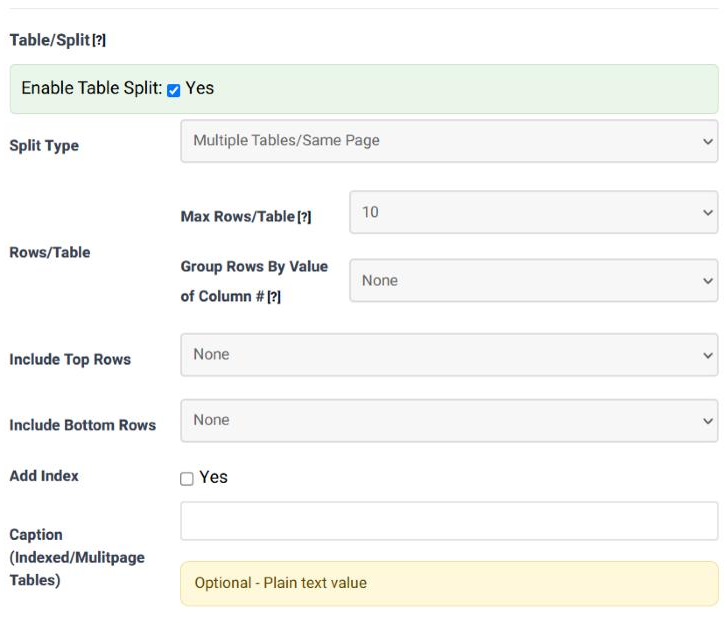
| Field | What it does | Options | Default |
|---|---|---|---|
| Enable Table Split | Switches splitting on. | Yes / no | Not ticked |
| Split Type | How the resulting tables are presented - see the next section. | None; Multiple Tables/Same Page; Multiple Tables/Separate Pages; Multiple Tables/Show & Hide | None |
| Max Rows/Table | Split by a fixed number of rows: every table gets this many data rows, and the last one takes what is left. | None; 1 … 10; 15, 20, 25, 30, 40, 50 … 120 | None |
| Group Rows By Value of Column # | Split by content instead: all the rows sharing a value in this column go into the same table. Sort the table by that column first, or a value that reappears later produces a second table for it. | None; 1 … 10 | None |
| Grouping Column After Split | What to do with the column you grouped by, whose value is now the same in every row of the table. Hiding it and showing it above each table turns it into a heading. | Keep it in every table; Hide it; Hide it and show its value above each table | Keep it in every table |
| Include Top Rows | How many rows from the top of the original table to repeat at the top of every table produced. This is how each table keeps its column headings. | None; 1 … 10; 15 … 120 | None |
| Include Bottom Rows | The same for the bottom: how many of the original's last rows to repeat under every table. | None; 1 … 10; 15 … 120 | None |
| Add Index | Adds an index - a list of links to the tables - so the visitor can jump to one. | Yes / no | Not ticked |
| Caption (Indexed/Multipage Tables) | Plain text put above each table, numbered as it repeats. Used by the index and by the separate-pages layout to name each table. | Free text, plain | Empty |
| Type | What the visitor sees | Good for |
|---|---|---|
| Multiple Tables / Same Page | Every table one after another down the page, each with its own header rows and caption. | A handful of groups a reader will scroll through: a table per region, a table per month. |
| Multiple Tables / Separate Pages | One table at a time, with controls to move between them, like the pages of a book. | Many groups, where showing them all would make the page enormous. |
| Multiple Tables / Show & Hide | Each table collapsed behind its caption; clicking one opens it. | Reference material: a long list of sections where a visitor wants one of them. |
A results table of 60 rows, with the country in column 5 and one header row. To get one table per country, each with its headings and the country as a heading rather than a repeated column:
| Field | Value |
|---|---|
| Split Type | Multiple Tables/Same Page |
| Max Rows/Table | None |
| Group Rows By Value of Column # | 5 |
| Grouping Column After Split | Hide it and show its value above each table |
| Include Top Rows | 1 |
| Add Index | Ticked |
Sort the data by country first - in the data source, or with a sorting rule - so each country appears once.
A split runs before the interactive features, so each table it produces is a table in its own right: it gets its own sorting arrows, its own search box and its own pagination if those features are on. That also means a visitor cannot sort across the whole set - the arrows reorder the rows of one table only.
Include Top Rows is at None. Set it to the number of header rows your table has, and they are repeated at the top of every table.
The rows for that country are not together in the data. A split by column value starts a new table whenever the value changes, so sort by that column first.
That is what Grouping Column After Split is for. Hide it and show its value above each table turns the repetition into a heading.
No. Choose one; the other stays at None.
It names each table - above it, in the index, and on the controls of the separate-pages layout. It is plain text, not HTML.
Open the Table Wizard, tick Table Split in step 2 and choose a split type in step 4.
Open the Table Wizard