View of the Status of your Tabulizer installation.
The Status Page
One page that answers "is this site set up properly?" - the version you are on, the version there is, what PHP allows, which libraries are present, and whether Tabulizer can write where it needs to. It is the first place to look when something does not work, and the first thing support will ask for.
Where it is
Components › Tabulizer, then Status in the toolbar. The page only reports; there is nothing to change on it, and the toolbar has only Close and Help.
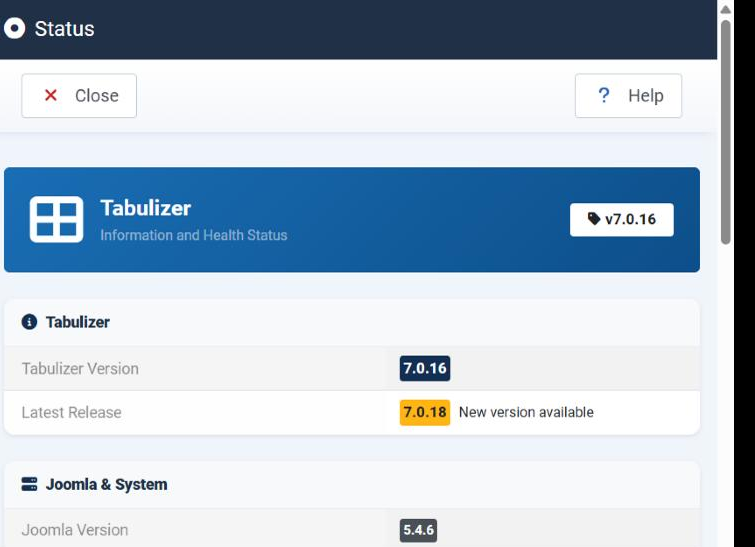
Tabulizer
| Row | What it tells you |
|---|---|
| Tabulizer Version | The version installed on this site. Quote it in any support request. |
| Latest Release | The newest version available, fetched from tabulizer.com. When it is ahead of yours the page says New version available. |
Joomla & System
The environment Tabulizer is running in. Most of these are PHP limits, and most trouble with large files or large tables comes back to one of them.
| Row | What it tells you | When it matters |
|---|---|---|
| Joomla Version | The Joomla this site runs. | Support, and knowing which Tabulizer build you should have. |
| PHP Version | The PHP the server runs. | As above. |
| PHP Memory Limit | How much memory a page may use. | A very large table or spreadsheet that dies halfway is usually this. |
| PHP Max Execution Time | How long a page may take, in seconds. | A slow data source, a big import, a long server-side query. |
| PHP Upload Max Size | The largest file that may be uploaded. | Importing a large ruleset archive or a large spreadsheet. |
| PHP Post Max Size | The largest form submission accepted. It has to be at least as large as the upload limit, or the upload never arrives. | As above - check both together. |
| PHP Magic Quotes | A long-obsolete PHP setting that mangled quotes in input. It should say No. | Only on very old hosting. |
PHP Libraries
Six PHP extensions Tabulizer uses. Each says Yes or No; anything saying No is a feature that will not work, and the fix is with your host, not in Tabulizer.
| Library | What stops working without it |
|---|---|
| PHP MBString Library | Handling text that is not plain ASCII - accented and non-Latin alphabets, and the replacement rules that work on them. |
| PHP ZipArchive Library | Importing and exporting archives, and language packs. Without it nothing can be unpacked. |
| PHP XML Parser Library | Reading rulesets, which are XML. Essentially everything. |
| cURL Library | Fetching anything over the network - a remote data source, the latest-release check. |
| JSON Library | JSON data sources, and the settings the wizards store as JSON. |
| iconv Library | Converting between character encodings, so a file saved in one encoding displays correctly in another. |
Directory Permissions
Tabulizer keeps the files it generates under the site's Tabulizer template folder, and each has to be writable. The page lists them with their full path and says Writable or not.
| Folder | What is kept there |
|---|---|
templates/tabulizer/css/ |
The stylesheet of each ruleset. |
templates/tabulizer/rules/ |
The rulesets themselves. |
templates/tabulizer/images/ |
Images a ruleset uses or adds to a table. |
templates/tabulizer/js/ |
Scripts belonging to a ruleset, including any JavaScript appended in the wizard. |
templates/tabulizer/calc/ |
Calculator definitions. |
templates/tabulizer/modify/ |
Modification functions. |
templates/tabulizer/graph/ |
Chart and graph definitions. |
templates/tabulizer/data/ |
Data files and cached data. |
What to do with this page
After installing
Open it once. Every library Yes, every folder Writable, and the limits high enough for the files you will be importing.
When something fails
Come here before anything else. An import that does nothing, a ruleset that will not save, a remote source that never loads - all of them show up here.
When you ask for help
Send the Tabulizer version, the Joomla version and the PHP version with your question. It saves a round trip.
Common questions
A library says No. What now?
It is a PHP extension, so it is enabled on the server - through your hosting control panel, or by asking your host. Nothing in Tabulizer can switch it on.
A folder says it is not writable.
Change its permissions on the server, with your host's file manager or over FTP. Then reload this page to confirm.
My upload limit is 180M but a 100M file fails.
Check PHP Post Max Size as well - the whole submission has to fit inside it, and an upload close to the limit will not. Execution time and memory can also cut a large import short.
Latest Release is blank.
The check could not reach tabulizer.com. Look at the cURL library, and at anything on the server blocking outgoing requests.
Does this page change anything?
No. It only reports.
Open the status page
In your Joomla administrator: Components › Tabulizer › Status.
Back to the Knowledge Base