The HTML File or Webpage Data Source
The HTML File or Webpage Data Source
Somebody else already publishes the table you want, on a page you do not control. This source reads that page, picks out one of its tables and hands the rows to your ruleset - so the result looks like the rest of your site and updates itself.
When to use it
Choose HTML file or Webpage when the data exists as a real <table> in a page - a published timetable, an exchange-rate list, a results page, a report your own site generates somewhere else.
| This source is right when | Something else is better when |
|---|---|
| The page contains a genuine HTML table and no machine-readable version is offered. | The same data is published as CSV or JSON - those are stabler and cheaper to read. |
| You want your own styling, sorting and filtering applied to somebody else's table. | The "table" is really a grid built out of <div> elements. There is nothing here to find. |
| The page is on your own site and generated by another extension. | The data comes from your own database - query it directly instead. |
The form
Components › Tabulizer › Data Sources › New Data Source, then set Source Type to HTML file or Webpage.
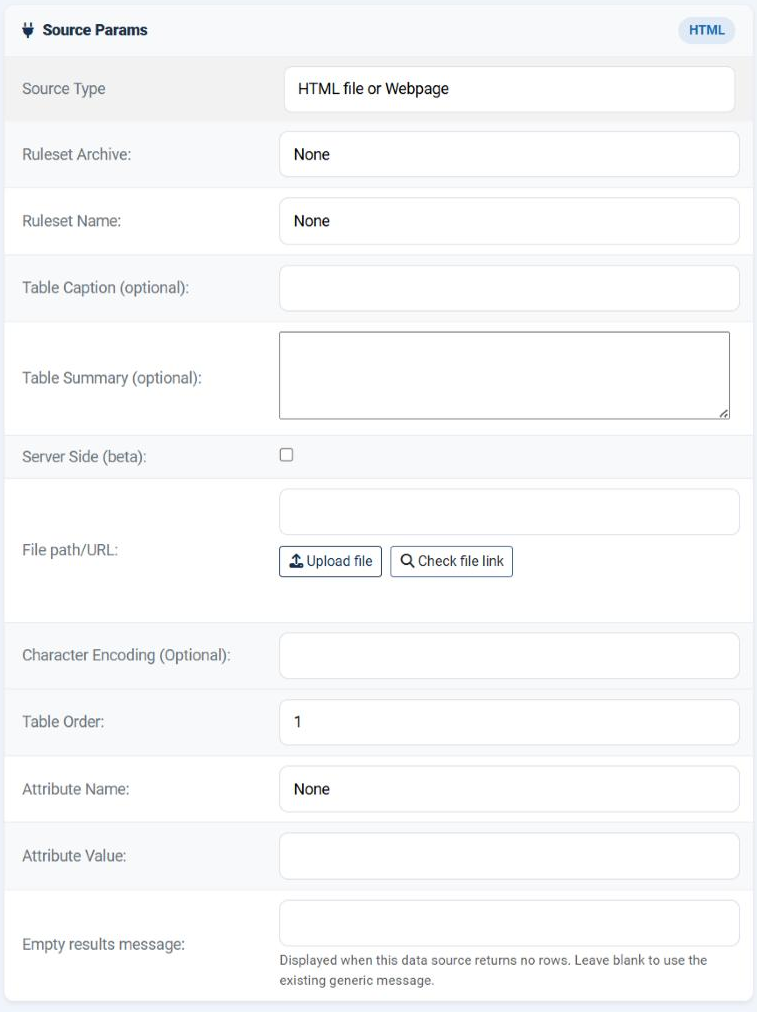
File path/URL
The page to read. The usual four forms are accepted: a bare file name held in Manage Data Files, a path relative to the site root, an absolute server path, or a URL. For this source type a URL is the normal answer.
Check file link beneath the field tests the address before you save, which is much faster than saving and previewing.
allow_url_fopen is enabled. Where neither is available - a common hardening choice on shared hosting - no URL will work, however correct it is. The Status page shows whether cURL is present.Character Encoding (Optional) works exactly as for the other file sources: leave it empty for UTF-8, and fill in the real encoding only if accented characters arrive mangled.
Choosing which table
A page usually contains more than one table - layout tables, a navigation table, the one you actually want. Three fields between them say which.
| Field | Options | What it does |
|---|---|---|
| Table Order | 1 to 32 | The position of the table in the page, counting from the top. 1 is the first table. |
| Attribute Name | None; id; name; class | Narrows the search to tables carrying that HTML attribute. None means "do not narrow - just count tables". |
| Attribute Value | Free text | The value that attribute must have: the id, the name, or one of the class names. |
How the two work together
| Attribute Name | What Table Order then means |
|---|---|
| None | The nth table in the whole page. 1 is the first table of any kind. |
| id, name or class | The nth table among those that match. With id that is nearly always 1, since an id is unique. With class it is how you take the second of several tables that share a class. |
class is forgiving. A table carrying class="table table-striped prices" matches an Attribute Value of prices, or table, or table-striped - each class name is considered separately, so you do not have to reproduce the whole attribute.id whenever the table has one. It is the only choice that survives the other site adding a table above yours - which is precisely what breaks a data source that counts positions.Finding the right values
Open the page in your browser
Right-click the table you want and choose Inspect.
Look at the <table> tag
If it has an id, use it: Attribute Name id, Attribute Value that id, Table Order 1. If it has a distinctive class, use that instead.
If it has neither, count
Leave Attribute Name at None and count the tables from the top of the page - including any used purely for layout. Start with your best guess.
Preview
Save and press Preview. If the wrong table appears, step the Table Order up or down by one. It is a two-minute loop.
When no table matches, the error names the Table Order you asked for and the source you asked it of - which tells you whether the page was read at all, or only that the table was not found in it.
What comes across, and what does not
| Carried over | Left behind |
|---|---|
| The rows and the cell contents of the chosen table. | The other site's CSS. Your ruleset decides how the table looks, which is the point. |
| The structure as the page wrote it, row by row. | Anything outside the table - headings, notes, a caption written as a paragraph above it. |
Header rows are a ruleset decision. If the page's table carries its column names in the first row, pick a ruleset whose header size is 1 and they are treated as headers.
colspan or rowspan - arrives as the rows the page actually wrote, not as a tidy rectangle. Preview before you trust it, and remember that interactive features such as sorting assume a rectangular table.Common questions
The wrong table appears.
Change Table Order by one and preview again, or pin it down properly with Attribute Name and Attribute Value.
No table is found, but the page loads in my browser.
Either the table is built by JavaScript - in which case it is not in the HTML and cannot be read - or the server could not fetch the page at all. Use Check file link to tell the two apart.
It worked for months and then stopped.
The other site changed. Re-inspect the page: a table was added above yours, or the class you matched was renamed.
The characters are wrong.
The page is not UTF-8. Name its real encoding in Character Encoding.
The table has links and images in it. Do they survive?
The cell contents come through as they were written. What the ruleset then does with them - keep them, strip them, restyle them - is up to the ruleset.
How often is the page fetched?
On every view unless you turn the cache on. For somebody else's page, do: an hour is a courteous and perfectly current refresh rate.
Can I read a page that needs a login?
No. The fetch carries no session and no credentials.
Build an HTML data source
In your Joomla administrator: Components › Tabulizer › Data Sources › New Data Source.
Back to the Knowledge Base