The RSS Feed Data Source
The RSS Feed Data Source
A news feed is a list of items with a title, a link and a date - which is a table that nobody has drawn yet. Point this source at a feed and you get exactly that, styled by your ruleset and refreshed by the publisher rather than by you.
When to use it
Choose RSS Feed for anything published as RSS 2.0 or Atom: a news site, a blog, your own Joomla site's feed, a podcast index, a notices feed from a supplier. The format is designed to be read by software, so it is far stabler than reading the equivalent web page.
The form
Components › Tabulizer › Data Sources › New Data Source, then set Source Type to RSS Feed.
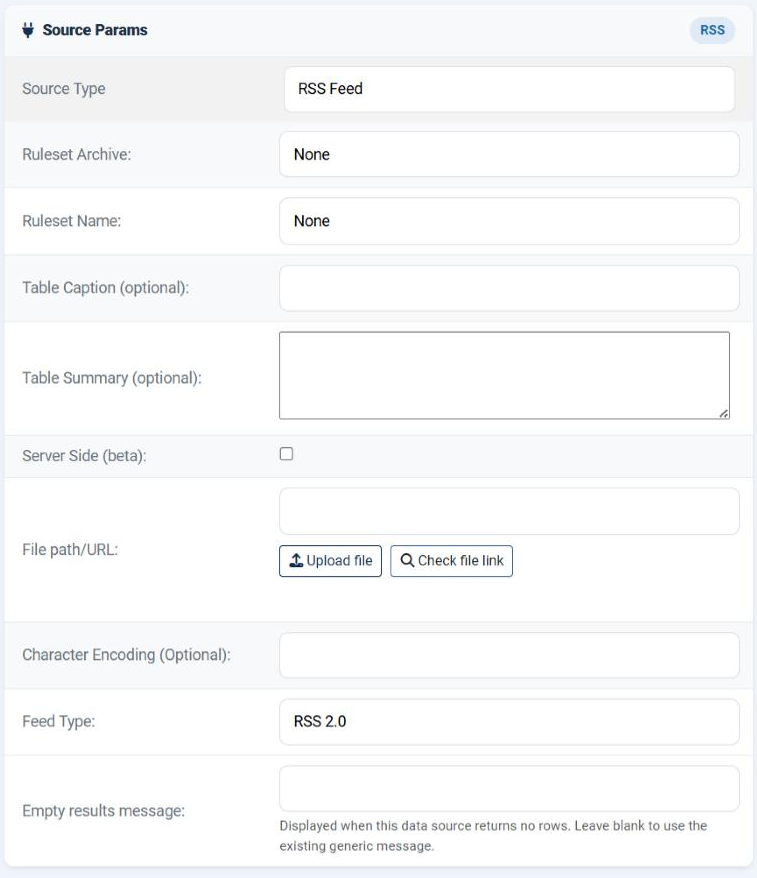
| Field | What it does |
|---|---|
| File path/URL | The feed address. Normally a URL - the one the publisher gives you, often marked with an orange icon or found in the page's source as application/rss+xml. A saved feed file works too. |
| Character Encoding (Optional) | Leave empty. Feeds declare their own encoding and are nearly always UTF-8; fill this in only if the characters arrive mangled. |
| Feed Type | RSS 2.0 or Atom. Say which the feed is - see below. |
| Empty results message | What to show when the feed is readable but currently has no items. |
allow_url_fopen as the fallback. With neither, no feed URL will work. The Status page shows whether cURL is present.Feed Type
Two formats do the same job and look alike from outside. Open the feed in a browser and look at the very first tag inside the XML declaration:
| The feed starts with | Choose |
|---|---|
<rss version="2.0"> or <rdf:RDF> |
RSS 2.0 |
<feed xmlns="http://www.w3.org/2005/Atom"> |
Atom |
RSS 2.0 is much the more common. If you are not sure, try it first: a wrong choice produces an empty table rather than an error, which is itself the clue to try the other one.
What the table contains
This is the part worth knowing before you design the ruleset.
| Column | What it holds |
|---|---|
| 1 | The item's title. |
| 2 | The item's link - the full URL of the article. |
| 3 | The item's publication date, exactly as the feed wrote it. |
There is no header row. The first row is the first news item. Use a ruleset whose header size is 0, or one that supplies its own headings - otherwise the newest item will be styled as if it were a heading.
The date arrives as text in whatever form the publisher used, which is usually the long RFC form. If you want it short, or sortable as a date, that is a job for the ruleset's column data type and formatting - not for this page.
Making it useful
Test the address first
Open the feed URL in your own browser. If it does not show XML there, it will not here either.
Create, save, preview
Three columns of recent items should appear. An empty table usually means the wrong Feed Type.
Turn the cache on
Fetching somebody's feed on every single page view is both slow and impolite. Fifteen to sixty minutes keeps the list current and the publisher happy.
Make the links clickable
Column 2 is a bare URL. The ruleset decides whether it becomes a link, and whether the title links instead - that is a styling rule, configured in the ruleset rather than here.
Common questions
The table is empty but the feed works in my browser.
Change Feed Type to the other option. An RSS feed read as Atom, or the reverse, finds no items and says nothing.
The feed will not load at all.
Use Check file link. If it fails while the URL works for you, the server is not allowed to make outgoing requests - look at the cURL library on the Status page.
I want more than twenty items.
Not from this source. Build the table with the online RSS wizard, which lets you set the item count and the fields.
I want the description as well.
Same answer: the wizard exposes description, author and category; this source gives title, link and date.
The first item is styled as a header.
The ruleset's header size is 1 and there is no header row here. Use a ruleset with a header size of 0.
The dates are long and ugly.
They arrive as the publisher wrote them. Reformat them in the ruleset.
How current is the table?
As current as your cache time allows. With the cache off it is fetched on every view - current, but slow.
Build an RSS data source
In your Joomla administrator: Components › Tabulizer › Data Sources › New Data Source.
Back to the Knowledge Base