The External Database / Query Data Source
The External Database / Query Data Source
The same idea as the database source, pointed somewhere else: a second database on this server, or one on a machine across the network. Supply the connection details and a SELECT, and that system's data appears as a table on your site.
When to use it
Choose External Database/Query when the rows live outside this site's own database: a stock system, an ERP, a legacy application, a second Joomla or WordPress site, a reporting database. It is the most direct way to put live business data on a public page without an export in between.
The form
Components › Tabulizer › Data Sources › New Data Source, then set Source Type to External Database/Query.
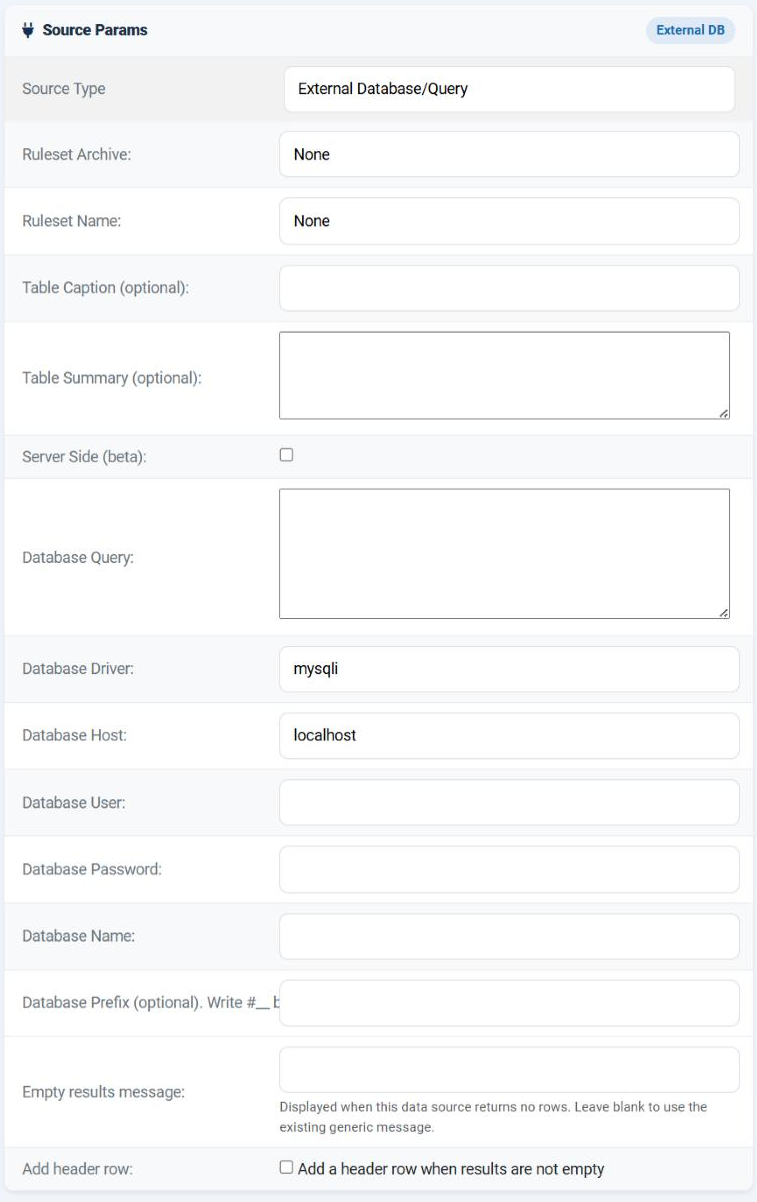
| Field | Required | What it does |
|---|---|---|
| Database Query | Yes | The SQL to run on the other database. Up to 8192 characters. |
| Database Driver | Yes | How to connect. See below. |
| Database Host | Yes | The server: localhost for a database on the same machine, otherwise a host name or an address. Add :3307 and so on if the port is not the standard one. |
| Database User | Yes | The account to connect as. |
| Database Password | Yes | That account's password. |
| Database Name | Yes | The database to select once connected. |
| Database Prefix (optional) | No | Lets you write #__ in front of a table name instead of the real prefix. |
| Empty results message | No | What to show when the query runs and returns nothing. |
| Add header row / Header row | No | A row of your own labels above the results, exactly as in the database source. |
The form refuses to save until all five connection fields and the query are filled in, which saves you a round trip through a confusing error.
Database Driver
Type the driver name. Beneath the field the page lists the drivers it has actually found on your server - that list is authoritative, because it is read from PHP as the page is built. It always offers mysql and mysqli, plus every PDO driver the installation has.
| Driver | Connects to | Notes |
|---|---|---|
mysqli |
MySQL and MariaDB | The usual choice, and the only one that does not go through PDO. Try it first. |
mysql |
MySQL and MariaDB, through PDO | Use when the list beneath the field shows it. |
pgsql |
PostgreSQL | Through PDO. |
sqlsrv |
Microsoft SQL Server | Through PDO, with a connection string of its own. The server must have the driver installed. |
| Anything else in the list | Whatever PDO driver it names | If a driver you need is missing, your host has to install the PHP extension - nothing in Tabulizer can add it. |
Database Prefix
Optional, and purely a convenience. Give it the prefix the other database uses and you may write #__ in the query where that prefix belongs:
| Prefix field | You write | What runs |
|---|---|---|
shop |
SELECT * FROM #__orders |
SELECT * FROM shop_orders |
| empty | SELECT * FROM shop_orders |
Exactly what you wrote. |
A trailing underscore in the field is harmless - shop and shop_ behave the same - and the older #_ spelling is accepted as well as #__. Fill it in when the other database is a Joomla or WordPress site, so the data source survives being pointed at a copy with a different prefix.
Security
| Point | Why it matters |
|---|---|
| The password is stored with the data source | It is held in the site's database as part of the parameters, so anyone who can read that database, or who can edit data sources, can recover it. Do not reuse a password that protects anything else. |
| It travels in an export | Exporting this data source puts the host, the user and the password in the zip. Treat that file as a credential, and do not hand it to anyone you would not give the password to. |
| Remote hosts need to allow the connection | A database on another machine usually refuses connections from unknown addresses. Your web server's address has to be allowed through the firewall and granted to the account. |
| A free-text parameter is refused in the query | As in the local database source, {user_param_…:text} cannot be used in SQL. Use int, float, date or cmd. |
Getting it working
Test the connection elsewhere first
Connect with the same host, user and password from a database client. If that fails, nothing here will work.
Start with the simplest query
SELECT 1, or a single column from one table with a LIMIT 5. Save and preview. Once the connection is proved, make the query real.
Add the headings
Tick Add header row, add one label per column, drag them into the order of your SELECT list.
Turn the cache on
Always, for a remote database. Every uncached page view opens a connection across the network - slow for the visitor and heavy on the other server.
The error messages distinguish the three ways this fails, which is most of the diagnosis: it could not connect to the host, it connected but could not select the database, or the driver is not supported on this server.
Common questions
"Cannot connect to the specified external database host."
The host, user or password is wrong, or the other server is not accepting connections from this one. Check the name and password first, then the firewall and the account's allowed hosts.
"Cannot select the specified database."
The connection worked - so the credentials are right - but the database name is wrong, or that account has no rights to it.
The driver is not supported.
Use one of the names listed beneath the Database Driver field. If the one you need is absent, the PHP extension is missing and your host must add it.
"PHP Data Objects (PDO) extension is not enabled."
Every driver except mysqli goes through PDO. Either use mysqli, or ask your host to enable PDO.
Accented characters are wrong.
The connection is UTF-8 and there is no encoding field. Convert in the query, or expose a view that is already UTF-8.
The page is slow.
A network round trip plus a query, on every view. Turn the cache on; this is exactly the case it exists for.
Can I join across my site's database and the external one?
Not in one query - each data source talks to one database. Build two data sources and combine them with a Data Source Merger.
Build an external database data source
In your Joomla administrator: Components › Tabulizer › Data Sources › New Data Source.
Back to the Knowledge Base