How to display Data Sources as Joomla modules
The Data Source Module
Put a table in a sidebar, a footer, or anywhere else your template has a position - without an article, without a tag, and without touching a single line of HTML.
What it is for
A data source is normally placed by putting a tag into an article. That is the right way when the table belongs in the writing - a price list inside the page that explains the prices. It is the wrong way when the table belongs to the page furniture: a staff list in every sidebar, a summary in the footer, an opening-hours table beside the contact form.
Module positions are how Joomla does page furniture, and Tabulizer Data Source is a module like any other. Pick a data source, give the module a position, choose which pages it appears on, and that is the whole job.
Where it comes from
The module is part of Tabulizer and installs with it. There is nothing separate to download: install or update the component and the module is there, in System › Site Modules › New, listed as Tabulizer Data Source.
The settings
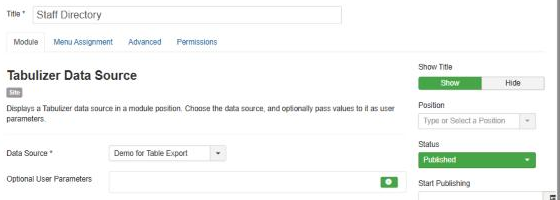
| Setting | What to do with it |
|---|---|
| Data Source (required) | Every data source on the site, by title. This is the only setting the module genuinely needs. If the list is empty, there are no data sources yet - create one in Components › Tabulizer › Data Sources first. |
| Optional User Parameters | Values handed to the data source when it renders. Leave it alone unless the data source asks for them - see below. |
| Position, Status, Menu Assignment | Joomla's own, and they behave as they do for any module. The table appears wherever the position is and on whichever pages you assign. |
| Module Class (Advanced) | Added to the module's wrapper, for when you want to style this one differently from its neighbours. |
Passing values to the data source
Some data sources are written to be told something: a query with a category in its WHERE clause, a file path with a year in it. Those placeholders are written {user_param_1}, {user_param_2} and so on, and Optional User Parameters is where a module supplies them.
| In the module | In the data source |
|---|---|
| The first row you add | {user_param_1:...} |
| The second row | {user_param_2:...} |
The numbering is positional: the first row is always parameter 1, whatever you type in it. Remove a row and everything below it moves up, so a data source expecting three parameters should be given three rows even if the middle one is left empty.
^) cannot appear in a value - it is the character that separates one parameter from the next, and one typed into a value is dropped. A colon is fine.Two things worth knowing if the data source is a database query. Tabulizer refuses :text parameters inside queries outright, because a free-text value in a query is an injection waiting to happen; use :cmd, :int, :float or :date, which are cleaned first. And whatever the module sends is fixed - it is a setting, not something the visitor can change - so a module cannot be used to let people filter a table by typing. For that, give the table its own search or filtering in the ruleset.
Putting one on the page
Build the data source first
And preview it in Components › Tabulizer › Data Sources. A module that shows the wrong table is two problems at once; the preview settles which of them you have.
Create the module
System › Site Modules › New, then Tabulizer Data Source.
Choose the data source and a position
Give it a title if you want one shown, and set Show Title to Hide if you do not.
Say where it appears
On the Menu Assignment tab. "On all pages" is the default and is usually not what you want for a table.
Save and look at the site
If nothing appears, work through the questions below before changing anything.
Common questions
Nothing appears on the page.
In order: is the module Published; is the Position one your template actually uses; does the Menu Assignment include this page; and is a data source chosen? A position that your template does not output is the usual answer, and it is easy to check - set the module to a position you can already see another module in.
The table is too wide for the position.
Module positions are often narrow and tables are often not. Give the data source a ruleset with a responsive pattern, or build a narrower version of the table - a module in a sidebar is a good reason to show three columns rather than nine.
Can I show two different data sources?
Yes - create two modules. Each has its own data source, position and pages.
Can I show the same data source in a module and in an article?
Yes, and that is a normal thing to do. They are independent: the data source is read for each, and its cache serves both.
Does it work with sorting, searching and paging?
Whatever the ruleset provides comes with it. Those features need room, though, so a sidebar is rarely the place for a paged, filterable table.
The table is slow to appear on every page.
A module on all pages reads its data source on every page view. Turn the data source's cache on - that is what it is for, and it matters more for a module than for an article.
I deleted the data source and the module is still there.
It will print nothing until you point it at another one. The module does not disappear on its own, and it does not complain on the front end either.
The module is not in the list of module types.
The component is installed but the module is not. Reinstall the Tabulizer package over the top; nothing you have built is lost.
Add one to your site
In your Joomla administrator: System › Site Modules › New › Tabulizer Data Source.
Back to the Knowledge Base