The JSON Data Source
The JSON Data Source
JSON is what one program hands another. When the list you want is already published in it - an export, an endpoint, a file some other system writes nightly - this source turns that list into a table with almost nothing to configure.
When to use it
Choose JSON when the data is a list of records in JSON, and that list is the whole document. It is the simplest of the structured sources: there is no mapping to write, because the structure is taken as it comes.
| This source fits | Think again when |
|---|---|
| A file whose top level is an array of records. | The records are buried under a wrapper such as {"status":"ok","data":{"items":[…]}} - this source reads the top level only. |
| A nightly export dropped into the data folder by another system. | You need only four of the record's twenty properties - every property becomes a column here. |
| An endpoint that returns a plain array and needs no key or header. | The endpoint needs an API key in a header, or a sign-in. |
The form
Components › Tabulizer › Data Sources › New Data Source, then set Source Type to JSON. It is the shortest form of all the types.
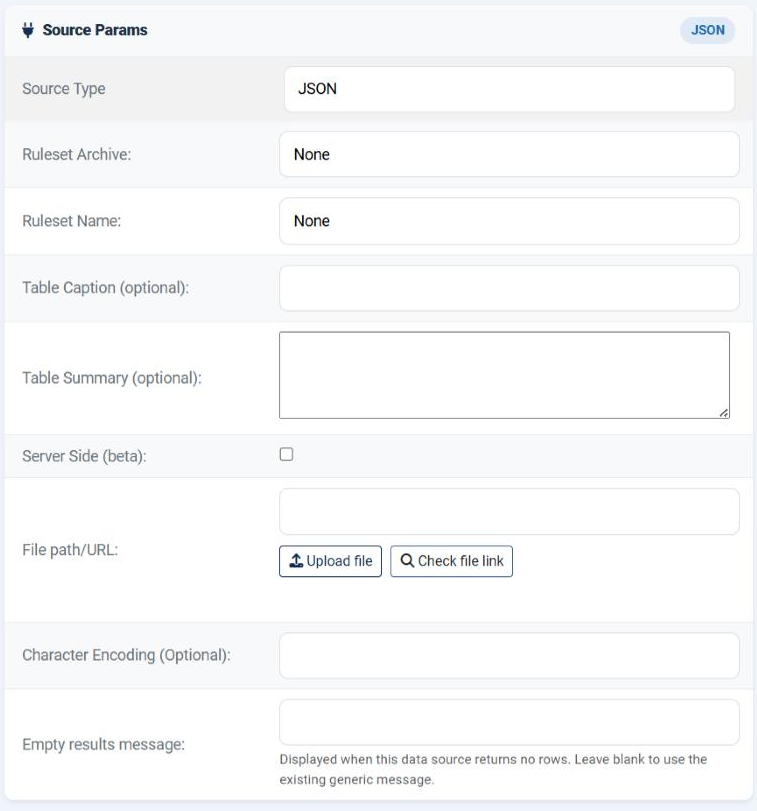
| Field | What it does |
|---|---|
| File path/URL | Where the JSON is: a file name held in Manage Data Files, a path relative to the site root, an absolute server path, or a URL. |
| Character Encoding (Optional) | Leave empty. JSON is UTF-8 by definition; this is a repair for a file that is not. |
| Empty results message | What to show when the document is readable but the list is empty. |
allow_url_fopen. This source reads the address directly with PHP's own file reading rather than through cURL, so unlike the CSV and HTML sources it has no cURL fallback. If your host has turned allow_url_fopen off, a URL will not work here - download the file to the data folder on a schedule and point at the file name instead.What the document should look like
The ideal shape is a plain array of objects, each object one record:
| Shape | What you get |
|---|---|
An array of objects - [{…},{…},{…}] |
One row per object, one column per property. The normal case. |
An array of arrays - [[…],[…]] |
One row per inner array, one column per value. Works equally well. |
A single object - {…} |
Treated as one record and rendered as a single row. |
A wrapper around the list - {"data":{"items":[…]}} |
Not what you want. The top level has one entry, so you get one row of nonsense. |
How the table is built
| Behaviour | What it means for you |
|---|---|
| There is no header row | The property names are not carried into the table - only the values are. Row 1 is the first record. Use a ruleset with a header size of 0, or one that supplies its own column headings. |
| Columns follow the order inside each record | The first property becomes column 1, the second column 2, and so on. |
| Every property becomes a column | There is no way to select a subset here. A record with twenty properties produces twenty columns; hide the ones you do not want in the ruleset. |
| Nested values are not flattened | A property whose value is itself an object or an array does not become several columns. Flatten the export instead. |
Writing the headings is therefore the ruleset's job. The usual arrangement is a ruleset whose first-row rule supplies the column names, so the data source stays a pure list of values.
Building one
Look at the document
Open the file or the URL in a browser. Confirm the outermost character is [, not { - if it is {, the list is wrapped.
Note the property order
The order inside the first record is the column order you will get. Write it down; you will need it when you set the headings in the ruleset.
Create and preview
Fill in the path, choose the ruleset, save, press Preview. The columns should line up with what you wrote down.
Cache it
Especially for a remote address. Parsing is quick; the network is not.
Common questions
I get one row of gibberish.
The document wraps the list - the top level is an object with one or two entries rather than the array itself. This source reads the top level only.
It says the contents are invalid.
The text did not parse as JSON. Paste it into any JSON validator; a trailing comma or a single-quoted string is the usual cause.
The URL works in my browser but not here.
allow_url_fopen is almost certainly off. This source has no cURL fallback - fetch the file to the data folder on a schedule and read it from there.
Where did my column names go?
Property names are not imported. Put the headings in the ruleset.
Can I import only three of the properties?
Not here. Take all the columns and hide the rest in the ruleset, or produce a narrower export.
One row's columns are shifted.
That record omits a property the others have. The columns are matched by position, so the record has to be complete.
Can I send an API key?
Only as part of the URL, if the endpoint accepts it that way. There is no header to set.
Build a JSON data source
In your Joomla administrator: Components › Tabulizer › Data Sources › New Data Source.
Back to the Knowledge Base