The Database Table / Query Data Source
The Database Table / Query Data Source
The data your site already holds, as a table on a page. Write one SELECT against this site's own database and the result becomes a Tabulizer table - current the moment it is displayed, with no file to upload and nothing to keep in step.
When to use it
Choose Database Table/Query when the rows already exist in this site's database: articles, registered users, orders taken by a shop extension, entries made by a forms extension, anything a component has stored. There is no export step and no staleness - the query runs when the page is served.
SELECT and nothing else. Access to create and edit data sources is controlled in Components › Tabulizer › Options, and it should be given only to people you would trust with the database itself.The form
Components › Tabulizer › Data Sources › New Data Source, then set Source Type to Database Table/Query.
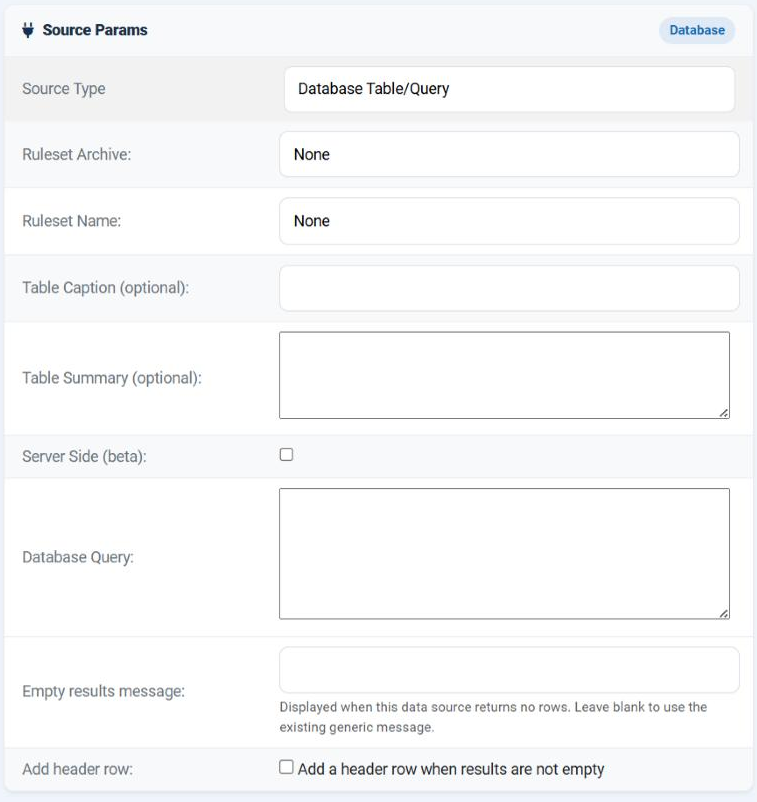
| Field | What it does |
|---|---|
| Database Query | The SQL to run. Required, and limited to 8192 characters. |
| Empty results message | What to show when the query runs and returns no rows - which for a query is a normal state, not a fault. |
| Add header row | Puts a row of your own labels above the results. See below. |
| Header row | Appears once Add header row is ticked: the labels themselves. |
Writing the query
Use Joomla's table prefix placeholder #__ rather than the real prefix, exactly as you would anywhere else in Joomla. It is replaced with this site's prefix when the query runs, so the data source still works on a site whose prefix is different - which matters the moment you export it.
| Write | Not |
|---|---|
SELECT title, created FROM #__content WHERE state = 1 ORDER BY created DESC LIMIT 20 |
… FROM jos_content … - correct on one site and wrong on the next. |
| Rule | Why |
|---|---|
| Name the columns you want | SELECT * gives you every column of the table in whatever order it was defined, including ones you will then have to hide. Listing them fixes the order and the count. |
| Order the rows yourself | Without an ORDER BY the database is free to return them in any order. Add one even when today's result happens to look right. |
| Limit the rows | A table of ten thousand rows is a slow page. Use LIMIT, or turn on the cache and server side. |
Avoid -- comments |
The query is stored on a single line, so a line comment would swallow everything after it. Use /* … */ if you must annotate. |
You may type the query across several lines for readability; the line breaks become spaces when it is saved.
What comes back
| Behaviour | What it means for you |
|---|---|
| One row per result row | In the order the query returned them. |
| One column per selected column | In the order of your SELECT list. This is why naming the columns is worth it. |
| Column names are not imported | Only the values arrive. Without Add header row there is no heading row at all, so use a ruleset with a header size of 0 - or tick the box below. |
| No rows is not an error | The data source reports an empty result, and your Empty results message is shown in place of the generic one. |
The header row
Tick Add header row and a small editor appears, because SQL column names - u.name, created, COUNT(*) - rarely make good headings.
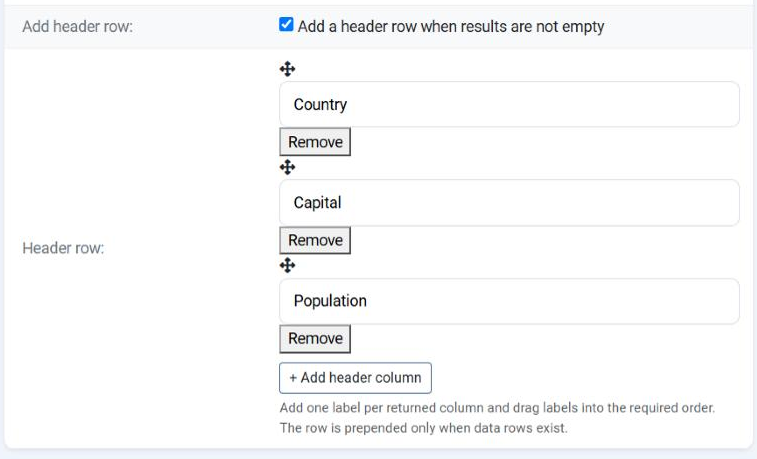
Add one label per column
Press + Add header column once for each column your query returns, and type the heading.
Put them in order
Drag the labels by their handle until they match the order of your SELECT list. Remove deletes one.
Use a ruleset with a header
The labels become row 1, so choose a ruleset whose header size is 1 and they will be styled as headings.
Making the query depend on the visitor
A query may contain placeholders that are filled in before it runs. This is how one data source becomes a personalised table.
| Placeholder | Replaced with |
|---|---|
{user_id} |
The id of the logged-in visitor, or 0 for a guest. |
{user_name} |
Their username. |
{user_email} |
Their e-mail address. |
{user_fullname} |
Their name. |
{user_groupids} |
The ids of the groups they belong to. |
{user_register_date}, {user_lastvisit_date} |
Their registration and last-visit dates. |
{site_lang} |
The site's current language tag. |
{current_datetime} |
The current time, as a Unix timestamp. |
So SELECT title, created FROM #__content WHERE created_by = {user_id} shows each visitor their own articles, from a single data source used on a single page.
Parameters passed with the tag
A value can also be handed in beside the tag or on the URL, and read as {user_param_name:type}. The type matters, because it is what makes the value safe:
| Type | What you get |
|---|---|
int |
A whole number. The right choice for an id. |
float |
A decimal number. |
date |
A date, normalised to YYYY-MM-DD. |
cmd |
Letters, digits, spaces, dots, hyphens and underscores only, up to 255 characters. |
text |
The raw text - and it is refused in a query. |
text parameter cannot be used in a query, and the form will not let you save one. Free text from a visitor inside SQL is an injection waiting to happen. Use int, float, date or cmd, each of which is cleaned to a shape that cannot carry SQL. The same restriction applies to file paths.Performance
| Situation | What to do |
|---|---|
| A small, cheap query on your own data | Leave the cache off. It is current, and the cost is negligible. |
| A heavy query - several joins, aggregates over a large table | Turn the cache on with a time that matches how often the answer really changes. |
| A query that is personalised per visitor | Be careful with caching; each distinct set of values is cached separately, so a per-visitor table can fill the cache with near-identical copies. |
| Thousands of rows | Cache on, Server Side ticked, and a ruleset with pagination - then the browser fetches one page at a time instead of all of it. |
Common questions
I get a database error.
The message comes straight from the database and names the problem. Test the query in phpMyAdmin first, with the real prefix in place of #__.
The table has no headings.
Column names are not imported. Tick Add header row and type them, and use a ruleset whose header size is 1.
The headings do not line up with the columns.
Their order must match the order of your SELECT list. Drag them into place.
The query will not save - it complains about a parameter.
You have used a text user parameter in the SQL. Change it to int, float, date or cmd.
Can I query a table that does not belong to Joomla?
Yes, if it is in the same database - write its real name. #__ is only a convenience for Joomla's own tables.
The page is slow.
Look at the query first - an index usually fixes more than any setting here. Then cache it.
Can I use this to update data?
Don't. A data source exists to read rows for display. Write a SELECT.
Build a database data source
In your Joomla administrator: Components › Tabulizer › Data Sources › New Data Source.
Back to the Knowledge Base