The JSON File / API Data Source
The JSON File / API Data Source
The grown-up JSON reader. Give it the address of an endpoint, tell it where inside the response the rows are, and name the properties you want as columns - so a real API response, wrappers and all, becomes a table without anything in between.
How it differs from the plain JSON source
Tabulizer has two JSON readers, and the difference is worth knowing before you choose.
| JSON | JSON File / API | |
|---|---|---|
| Where the data is | A file name in the data folder, a path, or a URL | A URL |
| Rows buried under a wrapper | No - it reads the top level only | Yes - give it the path |
| Choosing the columns | No - every property becomes a column | Yes - name the ones you want |
| Character encoding field | Yes | No; JSON is UTF-8 by definition |
Use JSON for a tidy file you control. Use JSON File / API for somebody's endpoint, which will almost certainly wrap its results in a status object and return twenty properties where you want four.
The form
Components › Tabulizer › Data Sources › New Data Source, then set Source Type to JSON File / API.
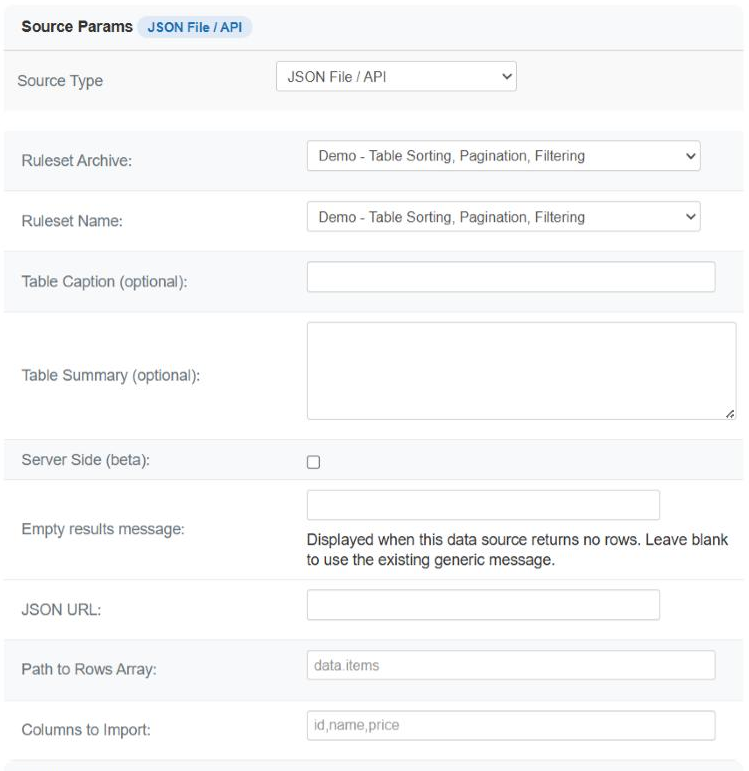
| Field | Required | What it does |
|---|---|---|
| JSON URL | Yes | The full address of a JSON file or a REST endpoint. |
| Path to Rows Array | No | Where the list of records is inside the response, in dot notation - data.items, results. Leave it blank when the response is already an array. |
| Columns to Import | No | A comma-separated list of property names to use as columns, in the order you want them. Leave it blank to take every property of the first record. |
| Empty results message | No | What to show when the endpoint answers but the list is empty - a normal state for a search or a "today's events" endpoint. |
allow_url_fopen as the fallback. The Status page shows whether cURL is present. There is no way to send a header, so an API that requires one cannot be read - only one that accepts its key as part of the URL.Path to Rows Array
Most endpoints do not hand you a bare array. They say something like this:
| The response | What to type |
|---|---|
[ {…}, {…} ] |
Nothing. The root is already the list. |
{ "results": [ {…}, {…} ] } |
results |
{ "status": "ok", "data": { "items": [ {…} ] } } |
data.items |
{ "payload": { "page": 1, "rows": [ {…} ] } } |
payload.rows |
Each segment is one step down the structure. If a segment does not exist, the error says exactly which one it could not find - which makes a typo a five-second fix rather than a mystery.
Columns to Import
Write the property names you want, separated by commas, in the order they should appear:
id,name,price
| What it does | Why it matters |
|---|---|
| Takes only those properties | An endpoint that returns twenty fields per record gives you the three you asked for, instead of twenty columns to hide in the ruleset. |
| Puts them in your order | The column order is the order of your list, not the order the endpoint happens to use. |
| Fills in what is missing | A record that lacks one of the named properties gets an empty cell, so every row has the same width and nothing shifts sideways. |
Leave it blank and the behaviour matches the plain JSON source: every property of the first record becomes a column, in that record's own order.
What the table contains
| Behaviour | Detail |
|---|---|
| One row per record | In the order the endpoint returned them. Sort in the ruleset if you want another order. |
| No header row | Property names are not carried into the table - only values. Use a ruleset with a header size of 0, or one that supplies its own headings. |
| Nested values are not flattened | A property whose value is itself an object or a list does not become several columns. |
| Empty is not an error | An endpoint that answers with an empty list shows your Empty results message. |
Building one
Look at the response
Open the endpoint in a browser. Find the array of records and note the chain of property names that leads to it.
Set the path, leave the columns blank
Save and press Preview. You get every property, which tells you their real names - including the ones with a capital letter you would have guessed wrong.
Name the columns
Now list the ones you want, in order. Preview again.
Add the headings in the ruleset
The data source produces values only; the column names belong to the ruleset.
Turn the cache on
Always, for somebody else's endpoint. It is slow to call and rude to call often - and many APIs count your requests.
Common questions
It says it could not find a segment of the path.
The message names the segment. Check the spelling and the capitalisation against the response, and remember the path is the chain down to the array, not to a record.
I get one row holding the whole response.
The path is missing or too shallow, so the reader is treating the wrapper object as a single record.
A column is empty for every row.
That property name does not exist on the records. Preview with the columns field blank to see the real names.
The URL works in my browser but not here.
The server is not allowed to make outgoing requests. Check the cURL library on the Status page, and ask your host about allow_url_fopen.
My API needs a key in a header.
Not possible here. If it also accepts the key as a URL parameter, put the whole URL in the field; otherwise fetch the data to a file on a schedule and read that with the JSON source.
Can it page through a paginated API?
No - it reads one response. Ask the endpoint for a large page in the URL, or collect the pages into a file yourself.
Where are my column headings?
Property names are not imported. Put the headings in the ruleset.
Build a JSON API data source
In your Joomla administrator: Components › Tabulizer › Data Sources › New Data Source.
Back to the Knowledge Base