Form Submissions
Form Submissions
Everything your Tabulizer forms have collected, in one list - what each visitor answered, whether the emails actually went out, and how to get it all into a spreadsheet.
What the page is
A form built with the FormBuilder wizard stores what visitors send, if you tell it to. Components › Tabulizer › Form Submissions is where those submissions land: a contact form, a quote request, a registration of interest, each one kept with its answers and the details of how it arrived.
It is the whole table. Calculator leads are stored in the same place and appear here too - Calculator Leads is the same list filtered to them, with the calculated figure given a column of its own. Anything you delete here is deleted there as well, because there is only one record.
The list
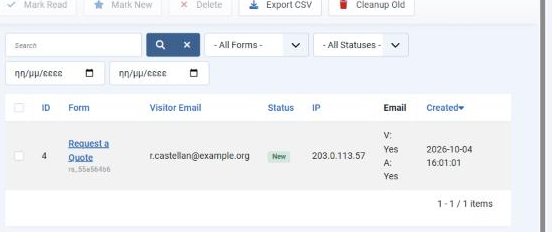
| Column | What it holds |
|---|---|
| ID | The submission's number, counting across every form on the site. |
| Form | Which form, by title, with its ruleset suffix underneath. Click it to open the submission. |
| Visitor Email | The address from the form's email field, when it has one. A form that asks for no address leaves this empty, and that is not a fault. |
| Status | New, Read or Archived. |
| IP | The address the submission came from. |
| Whether each message was sent, as V: for the visitor's copy and A: for your notification. This is the column to look at when somebody says they never heard back. | |
| Created | When it arrived. Newest first; the heading sorts the other way. |
Narrowing it down
| Control | What it does |
|---|---|
| Search | Matches the visitor's address and the form. The cross beside it clears the search and the filters together. |
| - All Forms - | One form at a time. The list offers every form that has ever stored a submission, so a contact form and a quote request stay apart. |
| - All Statuses - | Filter to New and the page becomes a queue of what you have not dealt with. |
| The two date boxes | From and to, on the created date. |
The toolbar
| Button | What it does |
|---|---|
| Mark Read / Mark New | Sets the status of the ticked rows. Nothing is sent to anybody - this is a flag for you. Mark New puts something back in the queue. |
| Delete | Removes the ticked submissions permanently. There is no trash to recover them from. |
| Export CSV | Downloads what the list is currently showing, so filter first and you export that form or that month rather than everything. |
| Cleanup Old | Deletes submissions past their form's retention period and reports how many went. |
Opening a submission
Click the form name on any row. The submission opens in two parts.
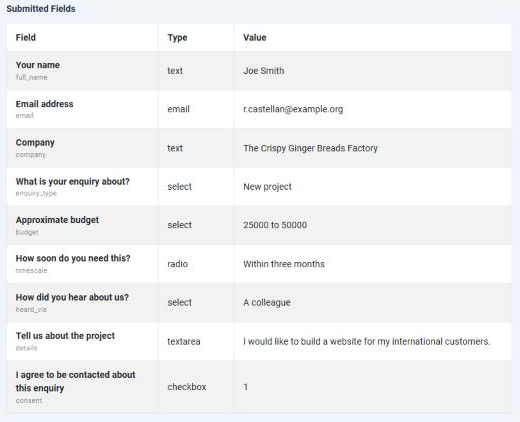
Submitted Fields lists every answer in the order the form asked for it: the label the visitor saw, the identifier underneath, the field's type, and the value. The type is worth reading - it tells you whether 25000 to 50000 came from a list you control or from a box the visitor typed into freely, which decides how much you can trust it when you sort or total a column later.
1 rather than "Yes". It means ticked. (The calculator's lead gate rewrites its own consent box into an answer with the agreement wording; a FormBuilder checkbox is kept as sent.)| Submission Details | What it tells you |
|---|---|
| Form | Which form, by title and suffix. |
| Status, Created, Updated | Where it stands and when. Updated changes when you mark it. |
| Visitor Email, Visitor IP, User Agent | Who sent it, from where, with what browser. |
| Page URL | The page the form was on. On a site with the same form in several places, this is how you tell which one is working. |
| Visitor Email Sent / Admin Email Sent | The long form of the list's Email column. Yes means Tabulizer handed the message to the mail system; No means it never left. |
Back returns to the list you came from, and Delete removes this one submission.
Working through them
Filter to New
So the page is what you have not answered rather than everything you ever received.
Open it and read the answers
Everything the visitor sent is on one page, in the order they were asked.
Reply from your own mail client
There is no reply button here, and that is deliberate - a quote goes out from your address, with your signature, as a normal message.
Mark Read
So tomorrow's queue means something. Mark New again if it needs another attempt.
Export when somebody else needs it
Filter to the form and the dates, then Export CSV. The file carries ID, created date, status, ruleset suffix and title, visitor email and IP, then one column per field, labelled as the visitor saw it.
Common questions
The page is empty, but I know the form was used.
Storage is switched off for that form - it emailed you and kept nothing. Turn storage on in the FormBuilder wizard; submissions from then on will be kept, but the ones already sent cannot be recovered.
Visitor Email is blank on some rows.
That form has no email field, so there is no address to show. The answers are still there - open the submission.
The visitor says they never got a confirmation.
Look at the Email column. V: Yes means the message was sent and the question is delivery - spam folders first. V: No means it was never sent, so check that the form has an autoresponder enabled and that Joomla's mail settings work.
I did not get my notification.
Same column, the A: half. A: No usually means no notification address is set on the form.
Why are calculator leads in here?
Because they are form submissions - the lead gate is a small form. Calculator Leads shows the same records filtered to calculators, with the calculated result as a column.
Can I edit what somebody submitted?
No, and it should stay that way: a submission is a record of what was sent. You can mark it or delete it.
Someone asks to be removed.
Find them with the search box, tick the row and press Delete. The record goes, answers and all.
How long is everything kept?
Until you delete it, or until Cleanup Old reaches something past its form's retention period. Nothing expires by itself, so a busy form left alone for a year will have a year of submissions in it.
Open your submissions
In your Joomla administrator: Components › Tabulizer › Form Submissions.
Back to the Knowledge Base