How to Translate the Table Labels to My Language
How to Translate the Table Labels to My Language
"Search:", "Previous", "Next", "Showing 1 to 10 of 57 entries" - the words around an interactive table come from Tabulizer's language file, not from your data. Install a language pack and they appear in your visitors' language; if there is no pack for it, translate the handful of lines yourself.
Where the labels come from
Tabulizer keeps every label and message it shows - in the administration and on the front end - in a plain text language file, en-GB.com_tabulizer.ini, one per language. The table labels your visitors see are a small block of it:
| Key | English |
|---|---|
COM_TABULIZER_DATA_TABLE_FILTER_LABEL |
Search: |
COM_TABULIZER_DATA_TABLE_PAGINATION_FIRST, _PREVIOUS, _NEXT, _LAST |
First, Previous, Next, Last |
COM_TABULIZER_DATA_TABLE_LENGTH_MENU |
Show _MENU_ entries |
COM_TABULIZER_DATA_TABLE_ENTRIES_INFO |
Showing _START_ to _END_ of total _TOTAL_ entries |
COM_TABULIZER_DATA_TABLE_INFO_EMPTY |
Showing 0 to 0 of 0 entries |
COM_TABULIZER_DATA_TABLE_INFO_FILTERED |
(filtered from _MAX_ total entries) |
COM_TABULIZER_DATA_TABLE_FILTERING_RETURNED_ZERO_RECORDS |
No records were found |
COM_TABULIZER_DATA_TABLE_IS_EMPTY |
Table contains no data |
COM_TABULIZER_DATA_TABLE_LOADING_RECORDS, _IS_BUSY |
Loading..., Table under processing ... please wait |
COM_TABULIZER_DATA_TABLE_SORT_ASCENDING, _SORT_DESCENDING |
The hints screen readers announce on a sortable heading. |
COM_TABULIZER_DATA_TABLE_INFO_THOUSANDS |
The thousands separator in those counts: , |
So the suggested path is short: use a ready-made language pack if there is one, and translate only if there is not.
Step 1: look for a language pack
On this site, open Download › Language Packs. Each pack is one zip holding one language, in a Joomla and a WordPress edition - take the one for your platform. At the time of writing there are packs for German, Spanish, French, Italian, Dutch, Polish and Portuguese.
Step 2: import it
Log in to the back end of your site. The Import Language button sits on the Tabulizer dashboard's toolbar, on both platforms:
| Platform | Where | Installed into |
|---|---|---|
| Joomla | Components › Tabulizer, then Import Language | administrator/language/<tag>/ |
| WordPress | Tabulizer › Ruleset Archives, then Import Language | wp-content/languages/tabulizer/<tag>/ |
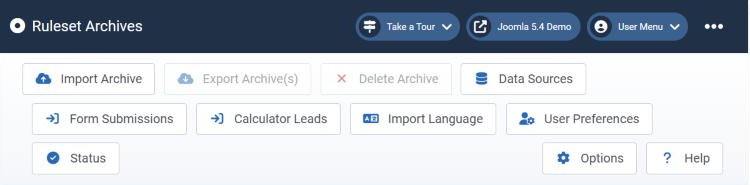
The WordPress toolbar has the same button in the same place. Choose the zip, tick Overwrite only if you are replacing a language you already have, and press Import. The page lists the languages already installed, so you can check the result there.
Which language do visitors see?
Tabulizer follows the language of the page being shown. It does not need a setting of its own, but your site must be running in that language:
| Platform | What decides the language |
|---|---|
| Joomla | The site language - the default in System › Site Languages, or the language of the current page on a multilingual site. Joomla's own language pack for it has to be installed. |
| WordPress | The Site Language in Settings › General, or the current language of Polylang, WPML or Weglot on a multilingual site. |
On a multilingual site that means one table, shown with German labels on the German pages and French labels on the French ones - as long as both packs are installed.
Step 3: no pack for your language? Translate the file
The language file is plain text, and you do not have to translate all of it - only the few lines your visitors actually see.
Find the English file
Joomla: administrator/language/en-GB/en-GB.com_tabulizer.ini
WordPress: wp-content/plugins/tabulizer/languages/en-GB/en-GB.com_tabulizer.ini
Copy it under your language's tag
Use your language tag for both the folder and the file name - el-GR/el-GR.com_tabulizer.ini for Greek, say - and put it here:
Joomla: administrator/language/el-GR/el-GR.com_tabulizer.ini
WordPress: wp-content/languages/tabulizer/el-GR/el-GR.com_tabulizer.ini
Translate the lines you need
Change the text inside the quotes of the COM_TABULIZER_DATA_TABLE_… lines listed above, and any others you care about. Save the file as UTF-8.
COM_TABULIZER_DATA_TABLE_FILTER_LABEL="Αναζήτηση:"
COM_TABULIZER_DATA_TABLE_PAGINATION_PREVIOUS="Προηγούμενη"
COM_TABULIZER_DATA_TABLE_PAGINATION_NEXT="Επόμενη"
COM_TABULIZER_DATA_TABLE_ENTRIES_INFO="Εμφάνιση _START_ έως _END_ από _TOTAL_ εγγραφές"
Lines you leave in English stay in English: Tabulizer loads English first and lets your file replace what it translates, on Joomla and on WordPress alike.
wp-content/plugins/tabulizer/ as a whole, and your file would go with it. wp-content/languages/tabulizer/ is outside it, and Tabulizer looks there first. If WordPress uses a short code for your language (Greek is just el), Tabulizer still finds an el-GR folder by its first two letters.Rules for the translation
| Rule | Why |
|---|---|
Never change the part before the = |
That key is how Tabulizer finds the text. Translate only what is inside the quotes. |
| Keep the placeholders | _START_, _END_, _TOTAL_, _MAX_ and _MENU_ are replaced with numbers and with the page-size menu. Move them where your grammar needs them, but keep every one, spelled exactly the same. |
| Keep the quotes straight | Each value sits between two plain " characters. A plain quote inside the text breaks the line - use typographic quotes (“ ”, « ») instead. |
| Save as UTF-8 | Anything else turns accented letters and non-Latin scripts into rubbish. |
Common questions
I imported a pack, but the tables are still in English.
The site is not running in that language. On Joomla, install Joomla's own language pack and make it the site language; on WordPress, set the Site Language in Settings › General. A page cached before the import may also need its cache cleared.
I only want to change "Search:" to something else, in English.
Then English is the language you translate. On WordPress, copy the whole English file to wp-content/languages/tabulizer/en-GB/en-GB.com_tabulizer.ini and change that line there; the copy replaces the plugin's own file completely, so it must keep every other line, and it survives updates. On Joomla, edit the line in administrator/language/en-GB/en-GB.com_tabulizer.ini and keep a note of it, because a Tabulizer update installs a fresh English file over yours.
Does a pack also translate the administration?
Yes. The same file holds the back-end texts, so users whose back end is set to that language see Tabulizer's pages in it too.
Will a Tabulizer update overwrite my translation?
Not if it is where this page says: administrator/language/ on Joomla, wp-content/languages/tabulizer/ on WordPress. After an update, compare with the new English file in case lines were added.
Read more
The Import Language page, field by field: How to Import a Language Pack.
Get your language
See which languages are ready to import, then use Import Language on the Tabulizer dashboard.
Go to the language packs